Typically, when working with an LLM, you send your data along with a prompt and receive a response. But this pattern often introduces issues, especially with public LLMs, due to security concerns and token bloat.
There is a different pattern we can use: the Schema-Driven LLM Query Pattern.
With this pattern, we only send the data schema to the LLM along with our question. The LLM returns the query syntax, which we then execute locally against our data. This significantly reduces the amount of data sent to the LLM, helping with both token usage and security.
Below is a quick overview of both patterns:
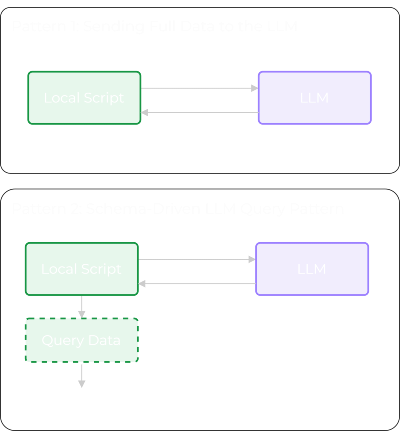
Let’s now walk through both the legacy pattern and the Schema-Driven LLM Query Pattern, in more detail.
Pattern 1: Sending Full Data to the LLM
In this pattern, you serialise your data (e.g., a DataFrame as JSON) and let the LLM analyse or filter it.
Step 1 - Create the Dataset
import pandas as pd

df = pd.DataFrame(
    {
        "device": ["core-rtr-01", "core-rtr-01", "core-rtr-01"],
        "interface": ["GigabitEthernet0/0", "GigabitEthernet0/1", "GigabitEthernet0/2"],
        "ip_address": ["10.0.0.1", "10.0.1.1", "unassigned"],
        "admin_status": ["up", "up", "down"],
        "oper_status": ["up", "down", "down"],
        "protocol_status": ["up", "down", "down"],
        "input_errors": [0, 12, 0],
        "output_errors": [0, 3, 0],
    }
)

print(df)
# Output:
#        device           interface  ip_address admin_status oper_status protocol_status  input_errors  output_errors
# 0  core-rtr-01  GigabitEthernet0/0    10.0.0.1           up          up              up             0              0
# 1  core-rtr-01  GigabitEthernet0/1    10.0.1.1           up        down            down            12              3
# 2  core-rtr-01  GigabitEthernet0/2  unassigned         down        down            down             0              0
Step 2 - Send Full Data to the LLM
from openai import OpenAI
import json

client = OpenAI()

data_json = df.to_dict(orient="records")

prompt = f"""
You are given Cisco interface data in JSON format.

Return interfaces that are administratively up but operationally down.

Output rules:
- Return only matching records as JSON.
- Do not include explanations or extra text.

Data:
{json.dumps(data_json, indent=2)}
"""

response = client.chat.completions.create(
    model="gpt-4o-mini",
    messages=[{"role": "user", "content": prompt}]
)

print(response.choices[0].message.content)
# Output:
# [
#   {
#     "device": "core-rtr-01",
#     "interface": "GigabitEthernet0/1",
#     "ip_address": "10.0.1.1",
#     "admin_status": "up",
#     "oper_status": "down",
#     "protocol_status": "down",
#     "input_errors": 12,
#     "output_errors": 3
#   }
# ]
What Just Happened
- The dataset was serialized.
- The dataset was sent to the external LLM.
- The LLM performed the filtering logic.
- A computed result was returned.
Though this worked, it doesn’t scale well as your dataset grows, and as you’ll appreciate, the security implications are less than ideal.
Pattern 2: Schema-Driven LLM Query Pattern
With this pattern, we no longer send the raw data. Instead, we send the schema.
Step 1 - Get the Schema
df_schema = df.dtypes

print(df_schema)
# Output:
# df.dtypes
# device               str
# interface            str
# ip_address           str
# admin_status         str
# oper_status          str
# protocol_status      str
# input_errors       int64
# output_errors      int64
# dtype: object
Step 2 - Ask the LLM to Generate the Query Logic
# Before running the code below ensure your OpenAI API key is exported:
# export OPENAI_API_KEY="your_openai_api_key"

from openai import OpenAI

client = OpenAI()

prompt = f"""
You are given a pandas DataFrame schema.

Return interfaces that are administratively up but operationally down.

Output rules:
- Return only valid pandas query syntax as Python code.
- Do not include explanations or extra text.

Schema:
{df_schema}
"""

response = client.chat.completions.create(
    model="gpt-4o-mini",
    messages=[
        {
            "role": "user",
            "content": prompt
        }
    ]
)

generated_code = response.choices[0].message.content
print(generated_code)
# result = df[(df['admin_status'] == 'up') & (df['oper_status'] == 'down')]
Step 3 - Execute Locally
result = df[(df["admin_status"] == "up") & (df["oper_status"] == "down")]
print(result)
# Output:
#         device            interface  ip_address admin_status oper_status protocol_status  input_errors  output_errors
# 1  core-rtr-01  GigabitEthernet0/1   10.0.1.1          up        down            down            12              3
Or we can print it out as a dictionary to make the output more comparable to the first pattern example.
print(json.dumps(
    result.to_dict(orient="records"),
    indent=2
))
# Output:
# [
#   {
#     "device": "core-rtr-01",
#     "interface": "GigabitEthernet0/1",
#     "ip_address": "10.0.1.1",
#     "admin_status": "up",
#     "oper_status": "down",
#     "protocol_status": "down",
#     "input_errors": 12,
#     "output_errors": 3
#   }
# ]
As you can see, we only sent the schema to the LLM. The LLM returned the query based on our prompt, and we executed that query locally against our data.
Summary
I hope you enjoyed this post and can see the benefits of this pattern.
The real advantage is that it’s not limited to pandas. You can apply the same approach to any dataset where you have a defined schema - REST APIs, GraphQL, databases, even structured log formats.
- Send the schema.
- Get back the query.
- Execute locally.
Thanks again and happy automating!
Sponsored by