
Introduction
The real value is not in asking a model how BGP works or how to configure a VLAN. It comes from connecting AI to the tools and data we already use to operate the network, including configuration backups, compliance results, CVE data, device state and automation jobs.
This is where the Netpicker AI Assistant comes in.
Rather than operating as a standalone chatbot, the AI Assistant sits within Netpicker and can work with the network information and capabilities already available within the platform. In this post, we'll look at what Netpicker is, how its AI Assistant works, and three practical use cases:
- AI-assisted network troubleshooting
- AI-assisted network security operations
- AI-assisted network configuration management
What is Netpicker?
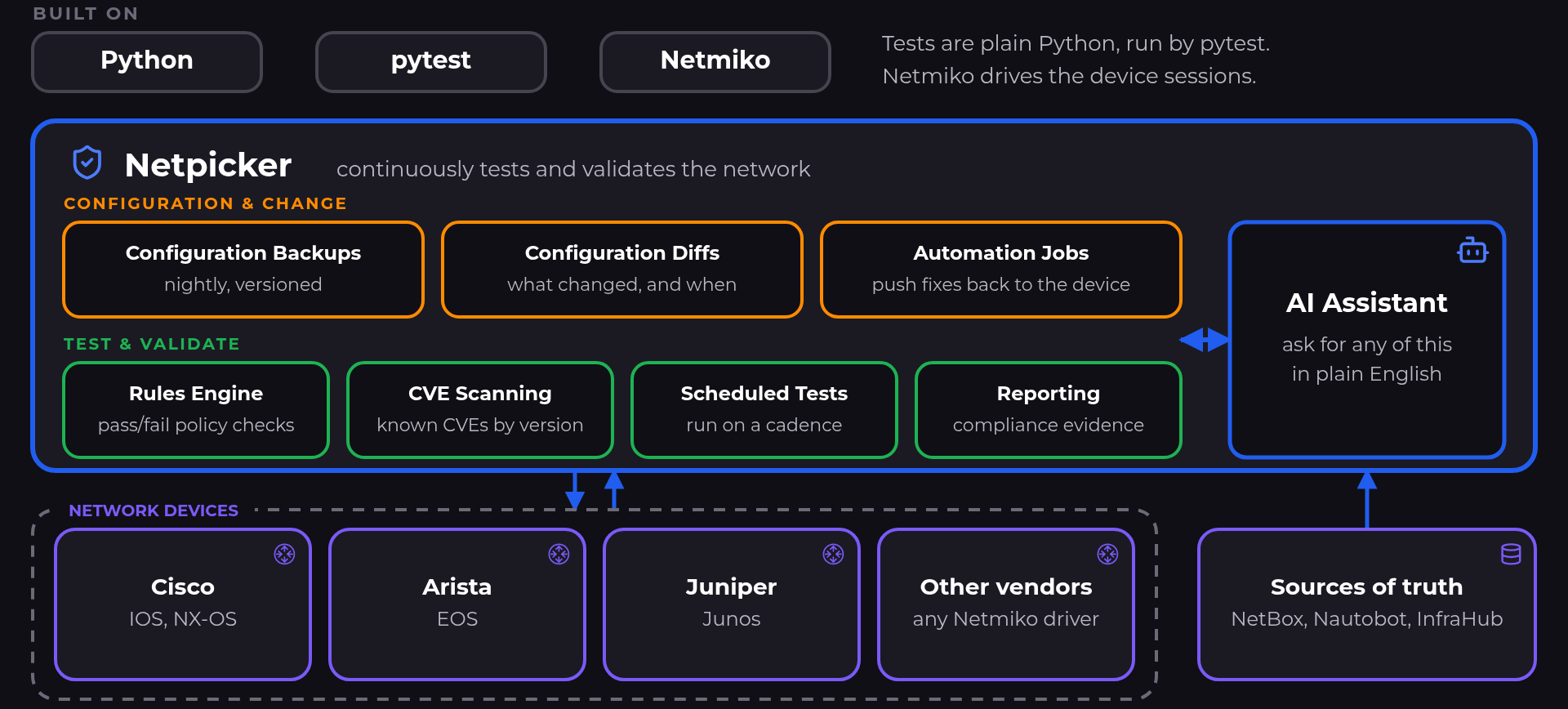
Netpicker is a Python-based, multi-vendor network compliance testing platform. At its core, Netpicker allows us to continuously test and validate the state and configuration of our network.
For example, we might want to check that:
- NTP is configured correctly.
- Devices comply with our configuration standards.
- If newly published CVE could affect the network.
Under the hood, Netpicker uses familiar Python tooling ; Netmiko to interact with network devices and pytest for building compliance and security tests.
What is the Netpicker AI Assistant?
The Netpicker AI Assistant provides a natural language interface into Netpicker.
If you've used tools such as ChatGPT or Claude, the interaction will feel familiar. Instead of navigating through different areas of the application, we can describe what we want to know or what we want Netpicker to help us do.
The difference is that the assistant isn't operating as a standalone chatbot. It can work with the information and capabilities already available inside Netpicker, including:
- Configuration backups.
- CVE information.
- Compliance rules.
- Automation jobs.
Check out our YouTube video on the use cases below!
Use Case 1: AI-Assisted Network Troubleshooting
One of the first questions we normally ask during a network incident is:
What changed?
If the network was working a few hours ago, configuration changes are one of the first places we want to look. Netpicker already maintains configuration backups and configuration differentials. The AI Assistant gives us a natural language interface into that data. For example:
What changed in the last 3 hours?
The assistant can check recent backups, identify configuration changes, and highlight devices where something has changed. We can then drill down further:
Show me the configuration differences for this device.
Rather than manually working through backup histories across multiple devices, we can quickly narrow the investigation down to changes around the time of the incident. For example, a configuration diff might show:
interface Ethernet4
+ shutdown
Tip: More frequent configuration backups provide a more granular change history when troubleshooting network incidents.
Use Case 2: AI-Assisted Network Security Operations
Another useful area for the AI Assistant is security and compliance.
A common example is when the security team reports a new vulnerability and we need to understand which network devices could be affected.
We can start with:
Show me any CVEs with a CVSS score of 8.0 or higher.
Netpicker can compare the operating system versions running across the network against known vulnerable versions and identify devices that may be affected.
However, a vulnerable software version doesn't necessarily mean the device is actually exposed. A vulnerability may only apply when a particular feature or configuration is present. This is where Netpicker's Rules Engine becomes useful. For example, we could ask:
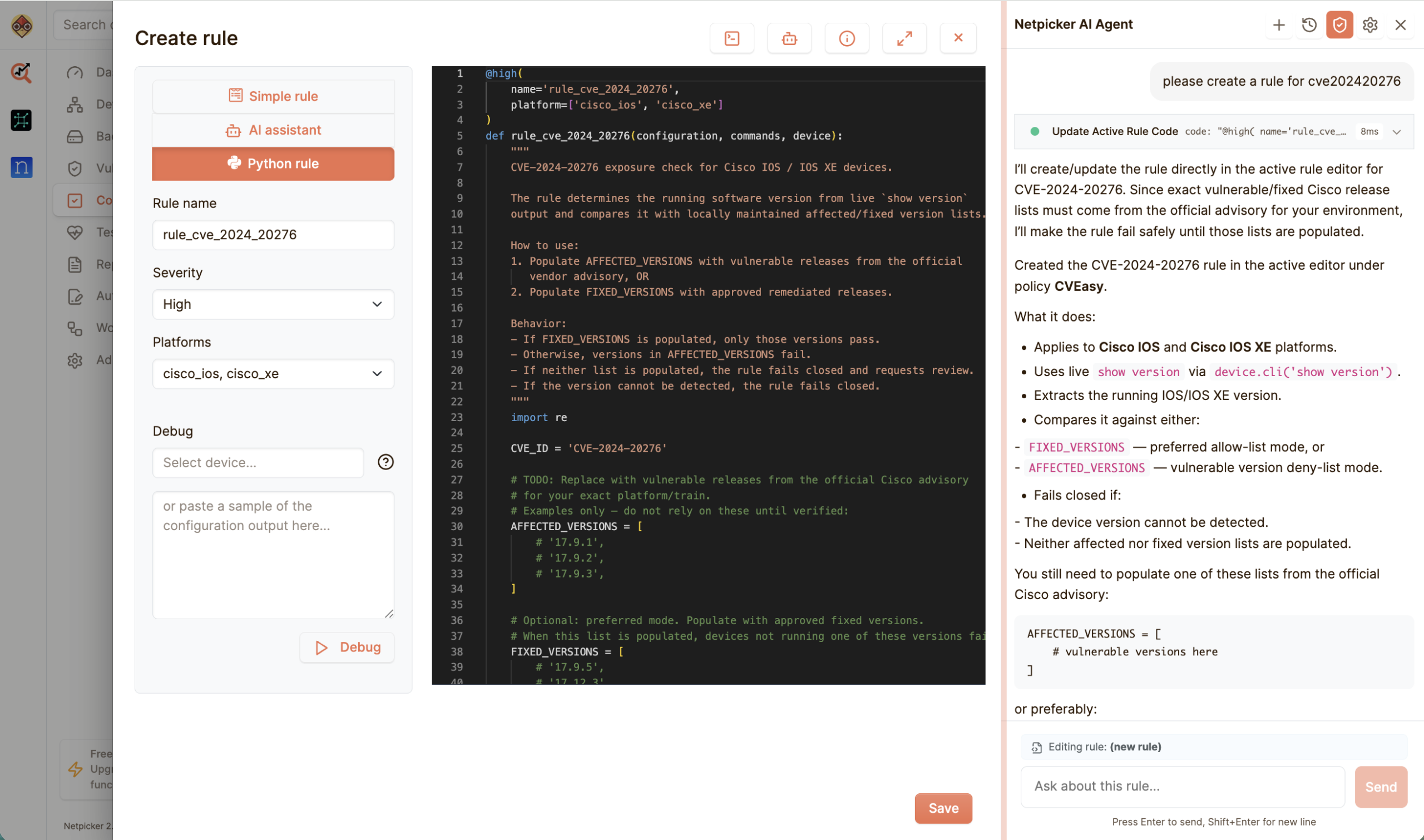
Create a rule that checks my SSH key size is at least 2048 bits.
For more complex checks, the AI Assistant can generate a Python-based rule that we can review, test, and run across the network. Once validated, the same rule can also be scheduled.
Use Case 3: AI-Assisted Network Configuration Management
The final use case is configuration management.
Alongside compliance testing, Netpicker provides automation jobs for making controlled configuration changes against network devices. The AI Assistant can help us create those jobs using natural language.
For example:
Create a job that adds a VLAN.
Make the VLAN ID and VLAN name runtime variables.
We could then provide:
VLAN ID: 250
VLAN Name: Cameras
The AI Assistant generates the initial Python job, which we can review before running it against the network. This review step is important. AI-generated automation should be treated like any other generated code.
Once the job runs, Netpicker also provides some useful controls around the change.
Note: Netpicker creates pre- and post-change backups around a configuration job, providing a clear configuration diff of what changed. For example, after our VLAN job we might see:
+ vlan 250
+    name Cameras
Getting Started
If you want to try Netpicker, there is a sandbox available on the Netpicker website where you can get hands-on with the platform.

Netpicker also provides a free license for up to 10 devices for compliance testing, along with unlimited configuration backups.
That's enough to start experimenting with configuration backups, compliance rules, and some of the AI-assisted workflows covered in this post.