Background
A question that came up during a recent NetBox training session was:
"How should authentication credentials be provided within NetBox webhooks?"
For example, you may need to send a webhook from NetBox to an external system such as:
- CI/CD platforms
- internal APIs
- configuration management systems
- notification services
Typically, those systems require some form of authentication.
For example:
Authorization: Bearer abc123
NetBox does provide a built-in webhook Secret field. However, this is designed for HMAC request signing rather than providing secret-based data to be sent directly to an external system.
So if the receiving system expects a bearer token or API key in the request, you need another approach.
Solution
One workaround is to use custom Jinja2 filters to expose environment variables into the webhook rendering context.
This works by:
- Storing the secret as an environment variable.
- Creating a custom Jinja filter in NetBox.
- Calling that filter from the webhook header or body.
This means the secret does not need to be hardcoded directly into the webhook configuration.
What Are Jinja Filters?
Jinja filters are small Python functions that can be called during template rendering. The filter receives the value, processes it, and returns the output.
For example:
{{ value | my_filter }}
Configuration
To create a custom jinja filter, inside configuration.py, add the following:
def jinja_get_secret(name):
    import os

    if not name.startswith("WEBHOOK_SECRET_"):
        raise ValueError(
            "Only WEBHOOK_SECRET_ variables allowed"
        )

    value = os.getenv(name)

    if value is None:
        raise ValueError(
            f"Environment variable {name} not found"
        )

    return value


JINJA2_FILTERS = {
    "jinja_get_secret": jinja_get_secret
}
This registers a custom Jinja filter named jinja_get_secret and also ensures the filter only allows access to environment variables beginning with WEBHOOK_SECRET_
This is important because it prevents arbitrary environment variable access from within Jinja templates.
Example Environment Variable
Set the environment variable on the NetBox host or container:
export WEBHOOK_SECRET_API_TOKEN=abc123
Or, in a container-based deployment, inject it via Docker, Kubernetes, or your secret manager.
Using It in a Webhook
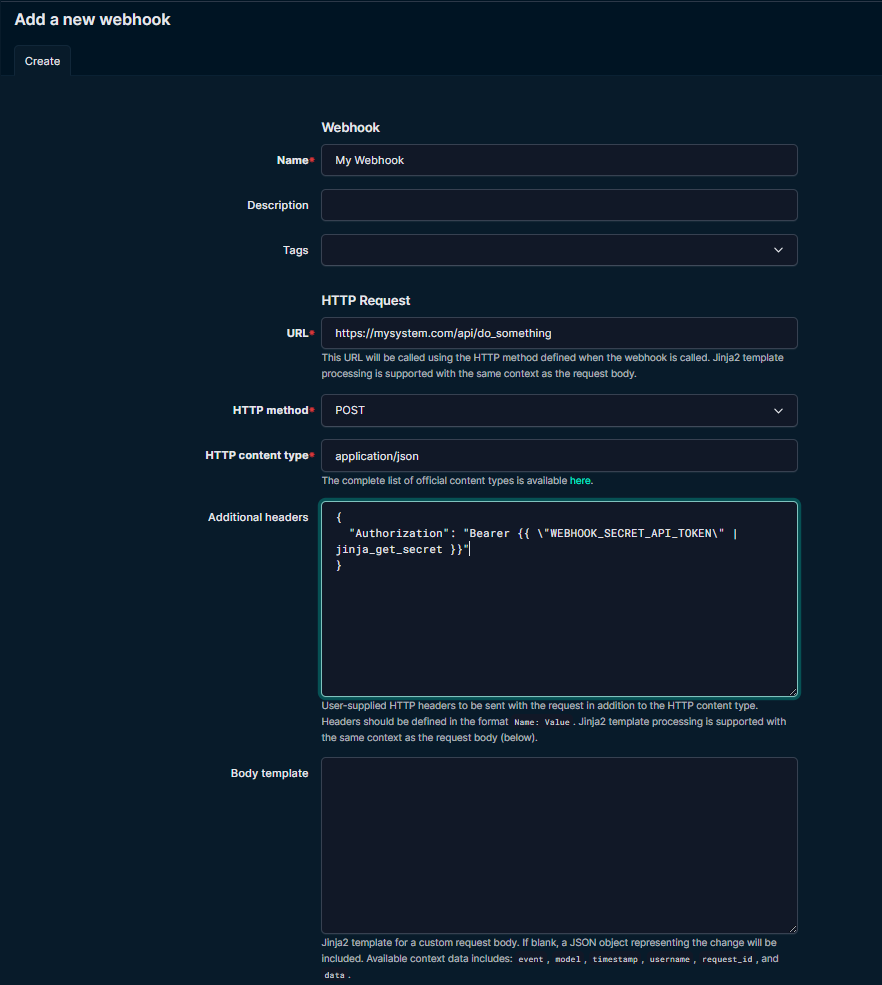
You can then reference the environment variable from the webhook.
Example header value:
Bearer {{ "WEBHOOK_SECRET_API_TOKEN" | jinja_get_secret }}
Which renders as:
Authorization: Bearer abc123
So the final webhook header would be:
{
  "Authorization": "Bearer {{ \"WEBHOOK_SECRET_API_TOKEN\" | jinja_get_secret }}"
}
Below also shows an example of how to configure this via the UI:
Final Thoughts
This solution is a practical way to handle authentication credentials in webhooks. It keeps secrets out of the webhook configuration, whilst still allowing dynamically injected authentication data at runtime.
Longer term, native secret handling for webhook headers would provide a much cleaner experience. But for now, this is a workable and production-friendly pattern for self-hosted NetBox environments.
Also, a shout out to Chris Russell from NetBox Labs for his help/guidance on this solution.